
 Spanish
CONTACT US
info@bidaiondo.com






You can now add posts you've been tagged in to your main Instagram feed.
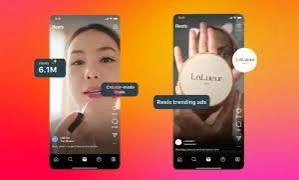
No more posts you're tagged in by friends getting buried in the background. Instagram's latest update lets you add posts you've been tagged in to your main feed grid, giving them more visibility if you want. How to add a post you're tagged in to your main feed Instagram CEO Adam Mosseri announced this new feature in a video posted to his Instagram account. The purpose of this simple update is to give users more control over what's shown on their profile by allowing them to add photos and videos they've been tagged in by their friends. This also reinforces the collaborative spirit of the social network, which is present in other features like Collabs and Blend.
To display posts you've just been tagged in on your feed, just follow these simple steps:
1- Open the notification in your Direct Messages.
2- Select the “Add to grid” option that will appear below the post notification.
3- It will appear in your main feed within seconds.
If you want to add a post you were tagged in a while ago to your main grid, here's what you need to do:
1- Go to the Tagged tab in your feed.
2- Open the post you want to add and click the two-line icon in the upper right corner.
3- Select the “Add to grid” option.
4- It will appear in your main feed within seconds.
The post's owner will receive a notification letting them know you've added the post to your main feed. It's also important to note that, by default, the photo or video will appear in your main feed in chronological order.
Last news
Meta lleva WhatsApp Business a la era agéntica con un nuevo servidor MCP

Ya puedes añadir a tu Feed principal de Instagram las publicaciones en las que te hayan etiquetado

online trading systems.
 We show you the best way to market products and services online, through a professional service of installation, management and maintenance of your virtual store
We program to suit you
 We help you achieve operational excellence in all your business processes, whether they are production, logistics, service or office processes. In addition, we assure you to maintain continuous improvement in your management.
Bidaiondo Articles
Google's voice assistant, smarter and more agile thanks to the Gemini 3.8 Live and 3.8 Live Extended Thinking models
Real-time voice interaction with AI assistants is one of the areas where Google is focusing its efforts to offer a smoother user experience. Their latest advancement in this area is the recently announced Gemini 3.8 Live and Gemini 3.8 Live Extended Thinking models. These voice assistants, like their predecessors, allow for fluid, natural, and real-time voice conversations, but they stand out for their significant advancements in reasoning capabi...
You'll be able to buy the products you see on screen while watching a Prime Video series.
Amazon has just launched “Shop the Show,” a feature designed a year ago to allow viewers to purchase merchandise, clothing, or accessories featured in their favorite movies, TV shows, and sporting events in real time without pausing the main screen. How Shop the Show Works Surely you've watched a show and wondered where a character's outfit came from, like Ali's dress in Off Campus. Unlike other shoppable TV models that cl...
ABOUT US
FILES







Welcome to Bidaiondo, dear user
BIDAIONDO SL, as the party responsible for the website www.bidaiondo.com, uses its own operating cookies and those of third parties of an analytical nature to allow the use of the website, analyze our services and show you information related to your preferences based on a profile drawn up from of your browsing habits (for example: pages visited). Please bear in mind that, if you do not activate some types of cookies, such as operational and analytical cookies, your experience of using this website may be affected. You can obtain more information and configure your preferences in the CONFIGURE option that appears below, you can reject cookies in the REJECT AND CLOSE option or accept all cookies and continue browsing in the ACCEPT AND CLOSE option.
So do you want to know more?
Data privacy seems important to you, and it is to us too. We store cookie data for 13 months. If you want to know more, you can visit our pages Privacy Policy y Cookies policy. Do you know what cookies are? Cookies are files that are used by virtually all websites. When browsing our page, they are installed in your browser or device to ensure that the website works correctly and store information about your visit. The data provided by cookies treat the user anonymously and in no case do they store personal information.
The data collected by the cookies we use are:
- Addresses IP
- References of visited pages
- References of downloaded files
- The website itself www.bidaiondo.com
- https://www.moz.com
- https://secure/europeanssl.eu