
 Spanish
CONTACT US
info@bidaiondo.com


New voice effects for your Instagram audios
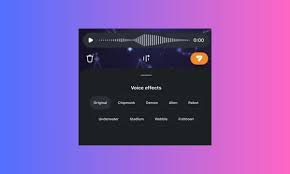
Instagram has launched a new feature that lets you add effects to the audio you send in direct messages.
How to add voice effects to your audio in Instagram DMs
Although these voice changes were already included in Edits, the platform's video editing app, it's not the same as having them there in your direct message conversations.
When you want to send an audio message with effects:
- Click on the microphone icon and record your message.
- Then, click on the icon with three lines that will appear at the bottom center of the screen.
- Choose the effect you like best: original, squirrel, demon, alien, robot, underwater, stadium voice (the one Mosseri probably used when sending his audio), wobble effect (a tremulous and distorted voice), or fishbowl voice.
If you can't imagine how your voice might sound with the "wobble" effect, you can try editing a video in Edits and take a look at the latest addition.
I wish the Instagram CEO had used the chipmunk voice, honestly.
This new feature is powered by Meta AI. When you want to send an audio message, you can choose from different effects to change your tone of voice without losing intensity, rhythm, or emotion. As Mosseri mentioned in his audio, "these are ways to make your audio messages more fun and creative."
Other Instagram Features
Since Mark Zuckerberg's social network loves to test things before officially launching them, some users have reported a new feature that allows them to include clickable links in Instagram post descriptions.
However, this is limited to accounts with Meta Verified (which requires a minimum payment of $15 per month) and to 5-10 links per month in descriptions. This is intended to prevent spam.
Last news
Meta lleva WhatsApp Business a la era agéntica con un nuevo servidor MCP

Ya puedes añadir a tu Feed principal de Instagram las publicaciones en las que te hayan etiquetado
online trading systems.
 We show you the best way to market products and services online, through a professional service of installation, management and maintenance of your virtual store
We program to suit you
 We help you achieve operational excellence in all your business processes, whether they are production, logistics, service or office processes. In addition, we assure you to maintain continuous improvement in your management.
Bidaiondo Articles
Google's voice assistant, smarter and more agile thanks to the Gemini 3.8 Live and 3.8 Live Extended Thinking models

Real-time voice interaction with AI assistants is one of the areas where Google is focusing its efforts to offer a smoother user experience. Their latest advancement in this area is the recently announced Gemini 3.8 Live and Gemini 3.8 Live Extended Thinking models. These voice assistants, like their predecessors, allow for fluid, natural, and real-time voice conversations, but they stand out for their significant advancements in reasoning capabi...
You'll be able to buy the products you see on screen while watching a Prime Video series.

Amazon has just launched “Shop the Show,” a feature designed a year ago to allow viewers to purchase merchandise, clothing, or accessories featured in their favorite movies, TV shows, and sporting events in real time without pausing the main screen. How Shop the Show Works Surely you've watched a show and wondered where a character's outfit came from, like Ali's dress in Off Campus. Unlike other shoppable TV models that cl...
ABOUT US
FILES







Welcome to Bidaiondo, dear user
BIDAIONDO SL, as the party responsible for the website www.bidaiondo.com, uses its own operating cookies and those of third parties of an analytical nature to allow the use of the website, analyze our services and show you information related to your preferences based on a profile drawn up from of your browsing habits (for example: pages visited). Please bear in mind that, if you do not activate some types of cookies, such as operational and analytical cookies, your experience of using this website may be affected. You can obtain more information and configure your preferences in the CONFIGURE option that appears below, you can reject cookies in the REJECT AND CLOSE option or accept all cookies and continue browsing in the ACCEPT AND CLOSE option.
So do you want to know more?
Data privacy seems important to you, and it is to us too. We store cookie data for 13 months. If you want to know more, you can visit our pages Privacy Policy y Cookies policy. Do you know what cookies are? Cookies are files that are used by virtually all websites. When browsing our page, they are installed in your browser or device to ensure that the website works correctly and store information about your visit. The data provided by cookies treat the user anonymously and in no case do they store personal information.
The data collected by the cookies we use are:
- Addresses IP
- References of visited pages
- References of downloaded files
- The website itself www.bidaiondo.com
- https://www.moz.com
- https://secure/europeanssl.eu