
 Spanish
CONTACT US
info@bidaiondo.com










New on TikTok: a feature to manage the keywords in your videos

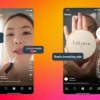
Yes, I know, when you started creating content on TikTok in 2020, you thought it was just about dancing and being funny to grow your following. However, if you're looking to implement a more solid strategy… that alone isn't enough. TikTok has just launched the "manage keywords" feature so you can add keywords to your videos after they're published, ensuring the algorithm shows them to people who are genuinely interested in that content. How to appear in your target audience's "For You" feed on TikTok Before we get into the details and explain the new feature, let's clarify a few things. TikTok works like this: you upload a video, it shows it to a small group of people, they see how your video performs, and if it does well, they show it to a slightly larger group. And so on. If, in the first group of people, the algorithm notices that no one is interacting with it, they stop watching after 3 seconds, or no one saves it… TikTok stops showing it. The key is getting your video to the people who are interested in the topic you're talking about. Considering how saturated users are with content… how do we reach our target audience? With SEO, dear marketer. Even though you thought SEO was going to die and GEO was going to be the norm, not so much (yet). In fact, we're seeing Instagram and TikTok videos appear as results every time we search for something on Google or browse Discover. We already explained this when we showed you how to use Creator Search Insights, when we told you that both Instagram and TikTok had limited the use of hashtags to prevent spam. Ideally, you should use hashtags as keywords integrated into the text, but also include them in the video script and subtitles. This way, the platform will understand your content much better and show it to the right people. Basically, they're asking us to spoon-feed them everything. That's why TikTok's new keyword management feature is so important. How to Add Keywords to Your TikTok Videos To be honest, I stumbled upon this feature by chance while uploading one of our podcast clips to TikTok (follow us!). Here's a step-by-step guide to using the "Manage Keywords" option on the Bytedance platform. 1- Upload a video to TikTok 2- Click on the three dots in the bottom right corner. 3- Scroll through the options until you find "Manage Keywords" 4- Choose which keywords you want to add and whether you'd like to block any. If you want to block keywords, keep in mind that all similar words will also be blocked. For example, if you don't want to include the word "dance," the word "dance" will also be blocked. 5- We don't currently know the limit you can add, but make sure they are relevant words that appear in the video and the caption of your post. From what we know, this new feature hasn't been around for very long, so we'll have to see how it works and whether these keywords have any effect on your statistics.
Last news
Meta lleva WhatsApp Business a la era agéntica con un nuevo servidor MCP

Ya puedes añadir a tu Feed principal de Instagram las publicaciones en las que te hayan etiquetado
online trading systems.
 We show you the best way to market products and services online, through a professional service of installation, management and maintenance of your virtual store
We program to suit you
 We help you achieve operational excellence in all your business processes, whether they are production, logistics, service or office processes. In addition, we assure you to maintain continuous improvement in your management.
Bidaiondo Articles
Google's voice assistant, smarter and more agile thanks to the Gemini 3.8 Live and 3.8 Live Extended Thinking models

Real-time voice interaction with AI assistants is one of the areas where Google is focusing its efforts to offer a smoother user experience. Their latest advancement in this area is the recently announced Gemini 3.8 Live and Gemini 3.8 Live Extended Thinking models. These voice assistants, like their predecessors, allow for fluid, natural, and real-time voice conversations, but they stand out for their significant advancements in reasoning capabi...
You'll be able to buy the products you see on screen while watching a Prime Video series.

Amazon has just launched “Shop the Show,” a feature designed a year ago to allow viewers to purchase merchandise, clothing, or accessories featured in their favorite movies, TV shows, and sporting events in real time without pausing the main screen. How Shop the Show Works Surely you've watched a show and wondered where a character's outfit came from, like Ali's dress in Off Campus. Unlike other shoppable TV models that cl...
ABOUT US
FILES







Welcome to Bidaiondo, dear user
BIDAIONDO SL, as the party responsible for the website www.bidaiondo.com, uses its own operating cookies and those of third parties of an analytical nature to allow the use of the website, analyze our services and show you information related to your preferences based on a profile drawn up from of your browsing habits (for example: pages visited). Please bear in mind that, if you do not activate some types of cookies, such as operational and analytical cookies, your experience of using this website may be affected. You can obtain more information and configure your preferences in the CONFIGURE option that appears below, you can reject cookies in the REJECT AND CLOSE option or accept all cookies and continue browsing in the ACCEPT AND CLOSE option.
So do you want to know more?
Data privacy seems important to you, and it is to us too. We store cookie data for 13 months. If you want to know more, you can visit our pages Privacy Policy y Cookies policy. Do you know what cookies are? Cookies are files that are used by virtually all websites. When browsing our page, they are installed in your browser or device to ensure that the website works correctly and store information about your visit. The data provided by cookies treat the user anonymously and in no case do they store personal information.
The data collected by the cookies we use are:
- Addresses IP
- References of visited pages
- References of downloaded files
- The website itself www.bidaiondo.com
- https://www.moz.com
- https://secure/europeanssl.eu